29th July, 2026
🌐 How a Website Loads in Your Browser
Introduction
Have you ever wondered what happens after you type a website address into your browser and press Enter? Within a few seconds, the requested webpage appears on your screen. Although this process seems almost magical, it involves several networking protocols and technologies working together behind the scenes.
In this tutorial, we will understand the complete journey of a webpage—from entering a URL to rendering the website in your browser.
Important Concepts
URL
A Uniform Resource Locator (URL) is the human-readable address used to access a website.
Every website has an IP address, but URLs make websites easy to remember.
DNS (Domain Name System)
DNS converts a domain name into its corresponding IP address so that browsers can locate the correct web server.
TCP
TCP establishes a reliable communication channel between client and server, guaranteeing ordered and error-free data transfer.
Web Hosting
Hosting stores website files on a web server connected to the Internet so users can access them anytime.
Website Loading Process
Step 1: Enter the URL
The user types the website URL into the browser and presses Enter.

Step 2: DNS Lookup
The browser contacts the DNS server to translate the domain name into an IP address.
Before contacting DNS, the browser checks:
- Browser Cache
- Operating System Cache
- Router Cache
- ISP DNS Cache
Step 3: Establish TCP Connection
The browser establishes a TCP connection with the destination server using the resolved IP address.

Step 4: TCP & TLS Handshake
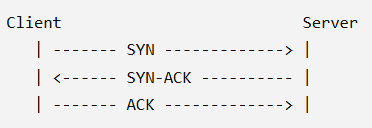
TCP performs a Three-Way Handshake to establish the connection. If HTTPS is used, a TLS handshake is also performed to encrypt communication.
TCP Three-Way Handshake
- SYN → Client requests connection.
- SYN-ACK → Server accepts request.
- ACK → Client confirms connection.
Step 5: HTTP Request & Response
a) HTTP Request
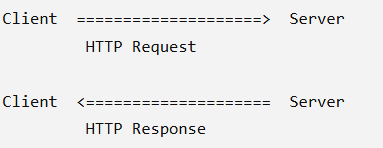
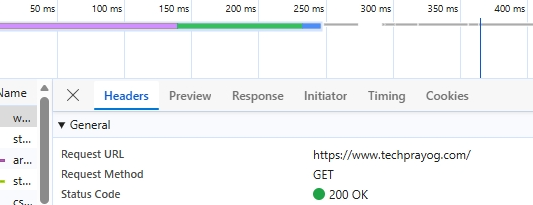
After the connection is established, the browser sends an HTTP request (typically a GET request, or sometimes a POST request) to the web server requesting the required webpage or resource.
b) HTTP Response
The web server processes the request and sends back an HTTP response containing the requested resource. Depending on the request, the response may include HTML, JSON, XML, images, CSS, JavaScript, or other files.
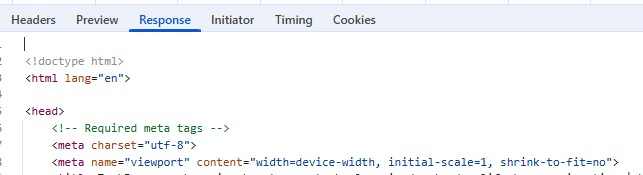
Step 6: Browser Rendering
Once the browser receives the response, it begins rendering the webpage. It parses the HTML to create the Document Object Model (DOM), applies CSS styles, executes JavaScript, and finally displays the fully rendered webpage to the user.
Just as a painter uses colors to complete a painting, the browser combines HTML, CSS, and JavaScript to present a visually appealing and interactive webpage.